

If your landing pages are slow or unstable, potential leads will abandon them before they ever fill out a form. Google’s Core Web Vitals provide a roadmap for measuring and improving the user experience. For lead-generation sites the payoff is more enquiries and a higher conversion rate.
Definition/overview
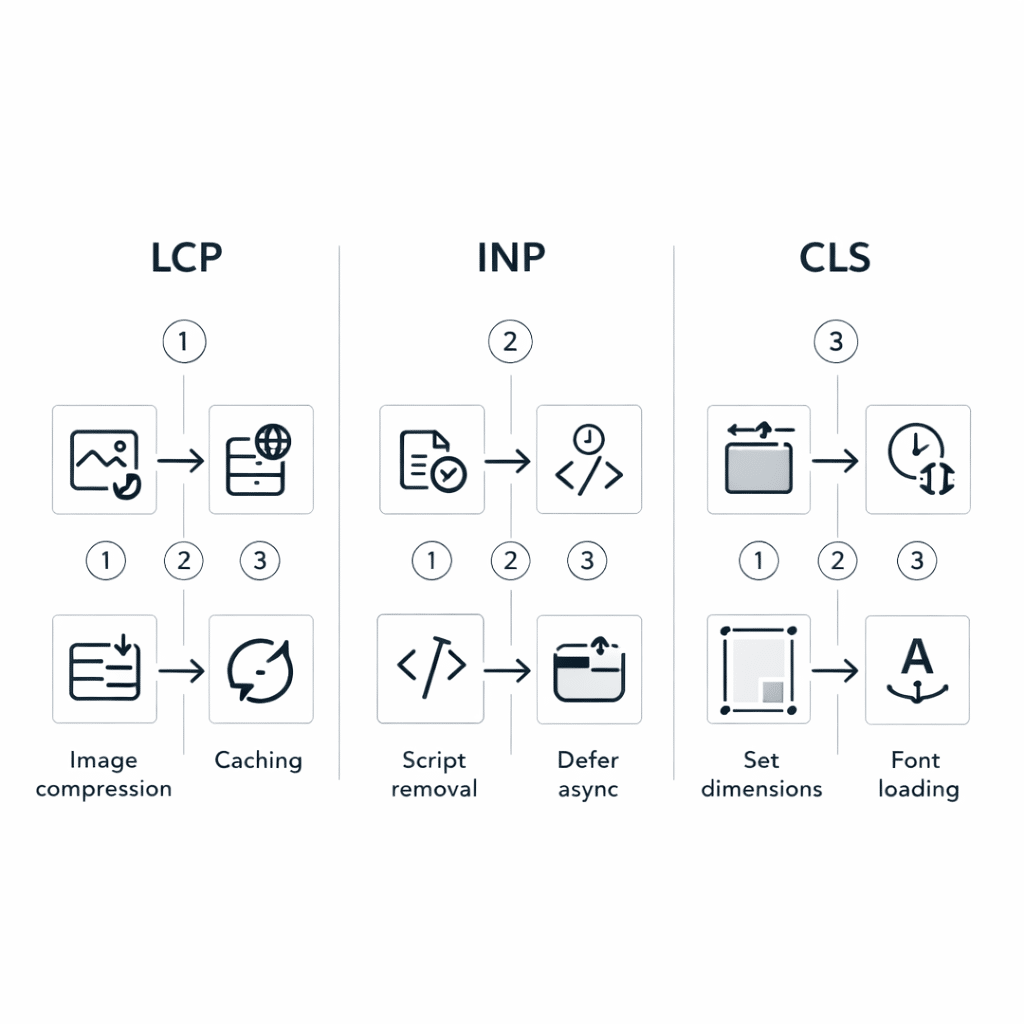
Core Web Vitals are a set of user-centric performance metrics that Google uses to evaluate page experience. The current metrics are Largest Contentful Paint (LCP), Interaction to Next Paint (INP) and Cumulative Layout Shift (CLS). LCP measures loading performance; aim for your largest element to render within 2.5 seconds. INP measures how quickly the page responds to user interactions; keep it under 200 milliseconds. CLS measures visual stability; pages should remain stable with a score under 0.1. Google assesses these metrics at the 75th percentile of user visits, across both mobile and desktop devices. While these measures influence search visibility, they also correlate strongly with conversion rates – faster, more stable pages build trust and reduce friction for potential customers.
Measure and prioritise performance using PageSpeed Insights and the web.dev Core Web Vitals guide.
Why the old way fails / common mistakes
In the past, many marketers obsessed over first input delay without addressing overall user experience. They embedded large hero videos, loaded multiple tracking scripts and ignored mobile performance. These pages might look impressive on a fast desktop connection, but on a 4G phone they take far too long to load. Other common mistakes include failing to set image dimensions, which leads to layout shifts, and neglecting to compress fonts and CSS. When forms or interactive widgets rely on heavy scripts, INP spikes and users abandon the form entirely.
Core principles
Improving Core Web Vitals is less about chasing scores and more about delivering a smooth experience. These principles will help you prioritise your efforts.
- Measure before you fix. Use tools like PageSpeed Insights and the Chrome User Experience Report to identify problem pages.
- Optimise images. Serve appropriately sized and compressed images and use modern formats like WebP.
- Reduce JavaScript and third-party scripts. Remove unused libraries, defer non-critical scripts and break long tasks into smaller chunks.
- Reserve space for images, ads and embeds to minimise layout shifts.
- Use caching and a content delivery network (CDN) to reduce server latency.
- Test interactive elements like forms on real devices to ensure quick responses.
Step-by-step implementation
Follow these steps to tackle the biggest performance bottlenecks first.
- Run PageSpeed Insights on your key landing pages and record LCP, INP and CLS scores.
- Identify the elements causing slow LCP, such as unoptimised hero images or sliders.
- Compress and resize images; implement lazy loading for below-the-fold content.
- Minimise and defer JavaScript. Break long tasks and remove unused code.
- Set explicit width and height attributes on images and embeds to prevent layout shifts.
- Leverage browser caching and serve assets via a CDN.
- Test interactive elements like forms using lab and field data to ensure INP remains under 200 ms.
- Monitor improvements in Search Console and lead tracking software to see how performance affects conversions.
Fast wins first checklist
- Identify your slowest landing pages.
- Optimise or replace large hero images.
- Defer or remove unused JavaScript.
- Reserve space for media elements to reduce CLS.
- Implement caching and enable compression.
- Test forms and CTAs on mobile devices.
- Track metrics using Search Console and analytics.
|
Issue |
Impact on leads |
Fast fix |
Needs dev? |
|
Large hero image |
Visitors bounce before reading |
Compress and use responsive images |
No |
|
Heavy JavaScript |
Slow interactions, abandoned forms |
Remove unused scripts and defer the rest |
Yes |
|
Unstyled ads or embeds |
Layout shifts and loss of focus |
Reserve space with CSS |
Yes |
|
Blocking CSS |
Delayed rendering of key content |
Inline critical CSS and defer non‑critical files |
Yes |
|
High server latency |
Long wait for first byte |
Use caching and a CDN |
Yes |
Mini example
A regional accounting firm noticed that its enquiry form had a 70 per cent abandonment rate. After compressing the hero image, removing a third-party chat widget and setting dimensions for all images, its page load time dropped from 4 seconds to under 2 seconds. Leads increased by 20 per cent in the following quarter. This was accomplished without a full redesign – just by prioritising the biggest performance wins.
How D-Legion Software helps
Our team builds high-performing lead-generation sites that convert. We offer audits to uncover performance blockers and then implement pragmatic fixes. Our designers work hand-in-hand with developers to deliver attractive, accessible and fast pages. Learn more about our website design and development services, discover how our online marketing expertise drives growth and browse our portfolio for examples. When you’re ready to improve your lead funnel, contact our team for a tailored performance plan.
FAQs
Which Core Web Vital matters most for lead-generation sites?
All three metrics are important, but LCP often has the biggest impact on whether a visitor stays long enough to convert. If your page takes more than a couple of seconds to load, many users will leave before interacting. That said, poor interactivity or layout shifts can also erode trust, so address whichever metric performs worst on your site.
What should I fix first if my metrics are poor?
Start with the easy wins: optimise images, remove unused plugins and set dimensions for all media. Then address larger problems like JavaScript bloat and server latency. Use a staged approach so you can measure how each change improves your scores and conversions.
How do I measure improvement and when will I see results?
Use PageSpeed Insights, Search Console and your own analytics to track performance before and after changes. Improvements in user experience can show up in conversion rates almost immediately. Ranking benefits may take a few weeks, but they tend to follow as Google recognises the improved quality.